
21 Building Your Timeline
CONTENT

- Rules to Consider
- How to Build a Timeline
- Other Considerations
- When Timelines Go Long
SLIDE DECKS
Some of the material presented in this chapter will be discussed in class. It is your responsibility to ensure you cover all the concepts presented both in class and in this textbook.
Building a good timeline requires us to balance several different things. First, we must consider requirement categorizations, prioritizations, and dependencies. Second, we must recall that our time on the job is not 100% devoted to coding.
Rules To Consider
Before we start building out the timeline, we need to consider/identify the following things:
- How many team members will be developing the project?
- What is the team’s velocity? This will depend on experience, but 70% tends to be a good starting place. With more inexperienced folks on the team, your velocity likely will be lowered.
- Does the company have shifts? Is there a 9 am to 5 pm team only, or does production run for 24 hours a day?
- Does the company work weekends?
- What is the project scope, and is it possible for dependent production to occur simultaneously? For some small projects, it may be possible to implement a requirement and the requirement it depends on simultaneously (or at least overlapping). For example, it might make sense to have someone building elements of the database and API at the same time that someone is developing the user interface and backend code that depends on the existence of the database and the API.
While the answers to these questions will vary based on the size and complexity of the project, team, and company, we will simplify things in CIS3750 by setting a few rules.
Timeline Rules for CIS3750
- Each team member (i.e. student) will work full-time despite your schedule. You aren’t expected to work full time (because you have other courses), but we will plan as if you are.
- We will assume that each team has 4 team members (regardless of the actual size of your team) working the same 9 am to 5 pm shift.
- We will assume a velocity of 80% unless otherwise stated.
- We will assume an iteration of 10 working days (i.e. two weeks) unless otherwise stated.
- You will develop a timeline assuming each team member works in parallel (assuming dependencies allow this).
- The team will not work weekends. Do not schedule work on weekends.
- Respect dependencies. There will be no simultaneous or overlapping production of a requirement and its dependencies.
- A requirement will be assigned to only one person.
- Do not split requirements across iterations.
How To Build A Timeline
While we will explore this more actively in class and lab, building a timeline will take some care and patience. To begin, we must consider the number of productive working days we have during each iteration.
Given our class rules, how many productive working days do we have per iteration per team member? Per team?
With these values in mind, you now know the maximum amount of work that can be assigned to each person and each team within an iteration. This doesn’t mean you must assign the maximum to each person, but you shouldn’t assign more.
Begin by selecting the very first requirement in your list of requirements. Assign this requirement to the first team member at the beginning of the very first day. If the length of time expected to complete the requirement exceeds the total productive days available to the team member, you will need to re-evaluate the requirement, and perhaps redraft it as two or more smaller requirements.
Once you’ve assigned the first requirement, we move on to the second one on our list.
If the second requirement depends on the completion of the first requirement, it must be assigned after the first requirement is complete. It can be assigned to the first person (if the combined total of requirements 1 and 2 is less than or equal to the number of productive working days they have available to them) or to any of the other developers if the amount of time available to them allows for them to completely implement it. Otherwise, the requirement will need to move to the next iteration.
If the second requirement does not depend on the first, then it can be assigned to any other developers beginning on day 1 (or after the completion of any other requirement).
This process is repeated for each requirement; filling in the requirements where feasible (a little like Tetris). This is illustrated over the next four pages, where iterations are filled out so that each developer is assigned work to fill up their timeline. Note, that there will be cases where a particular job will not allow every developer to be fully loaded.
Consider the following set of requirements and dependencies. The length of these requirements is indicated by the length of the box (either 1, 2, or 3 days in length). Our goal is to assign them to the empty timeline below. How might we do this?
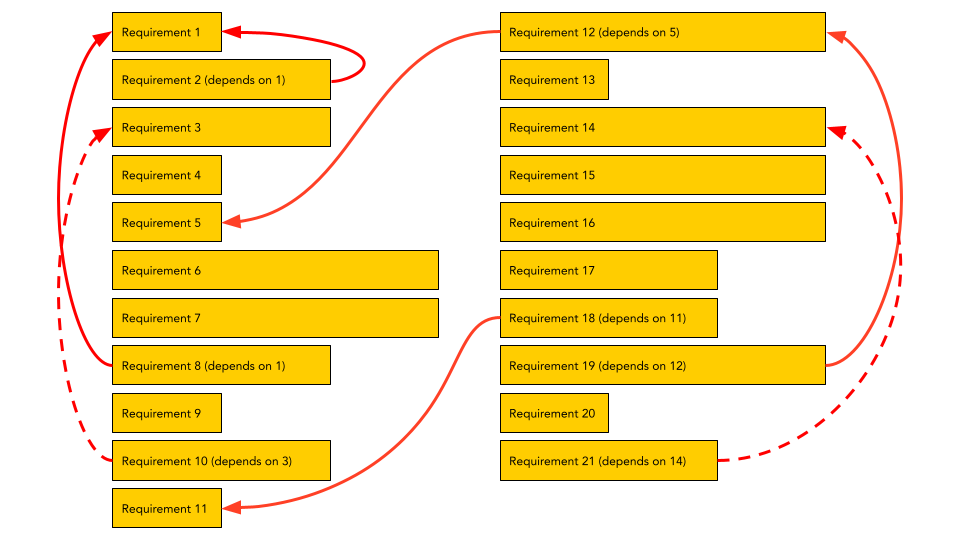
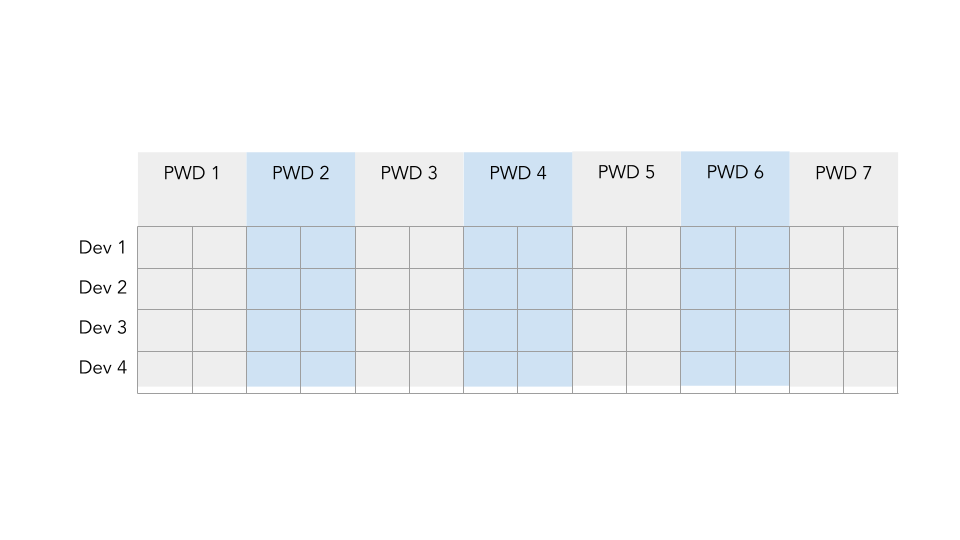
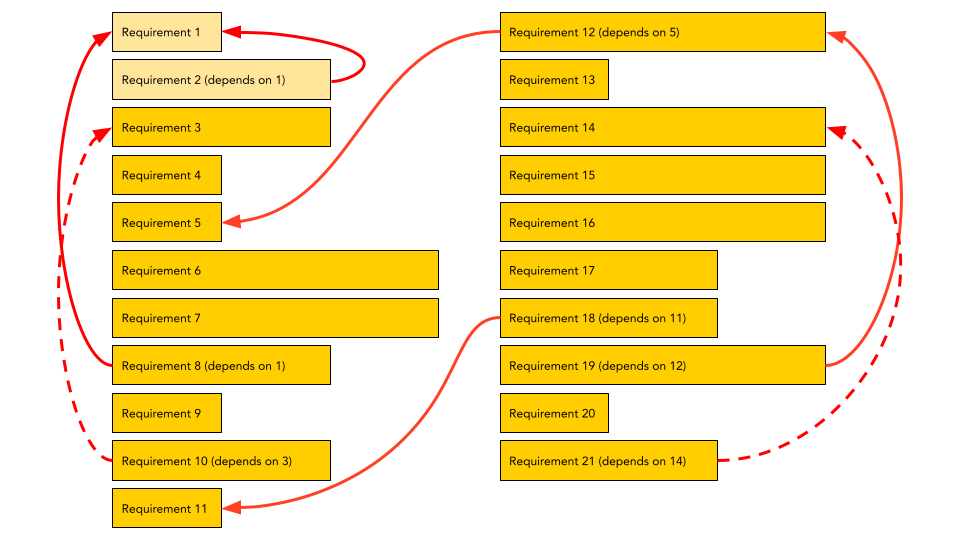
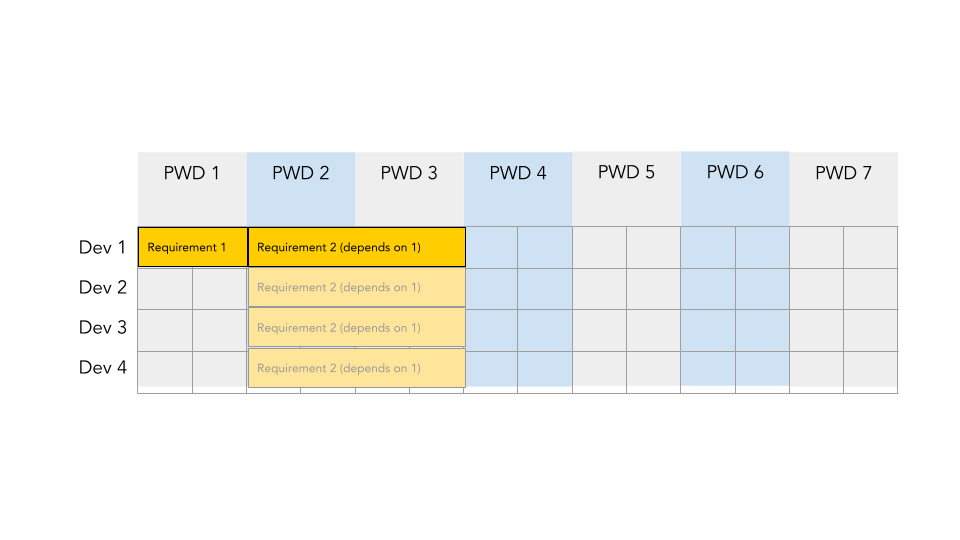
Following our general list of rules, we can assign Requirement 1 to Developer 1 during day 1. We could have assigned Requirement 1 to Developers 2, 3, or 4. Further, we could have started production on day 2, but that doesn’t seem like the best use of our developers’ time.
Having assigned Requirement 1 to Developer 1 during day 1, our task is to assign Requirement 2 to the timeline. Since Requirement 2 depends on Requirement 1, it cannot be placed in the timeline until after Requirement 1 has been completed. That means it could be assigned to days 2, 3, 4, 5, or 6. We can’t assign it to day 7 since it is too long to fit. We can also assign it to any of the developers. Here, we assign it to Developer 1, but note that it could be assigned to any of the other 3 developers.
Repeating this process – assigning requirements to a developer based on the time they have available to work while respecting the dependencies could result in different timelines. Check out the following timelines that respect the dependencies, but which assign different requirements. Requirements that don’t make it into this iteration might then be assigned to the next iteration.
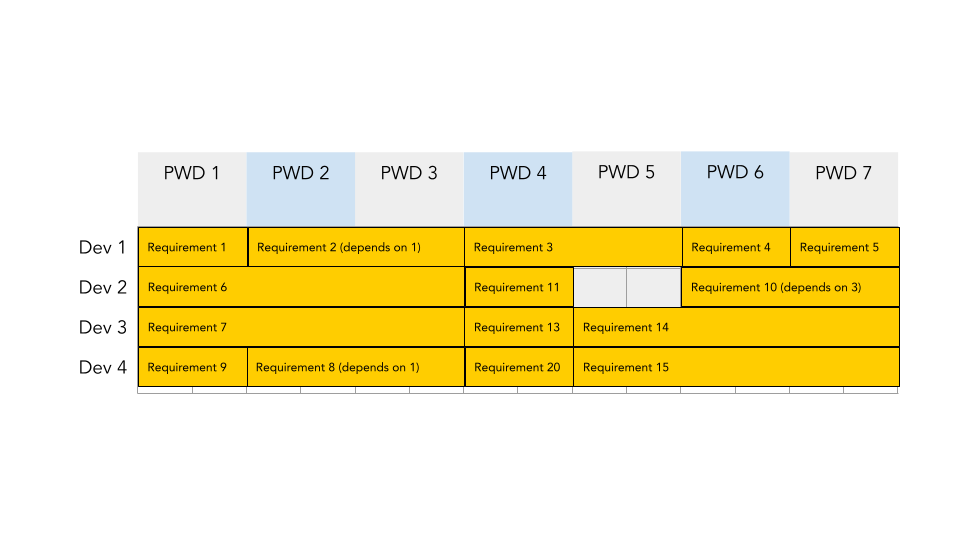
If we were careful, we could rearrange the timeline and perhaps select a different set of requirements to use all the available production time that our team has. For example, a full timeline might look like this:
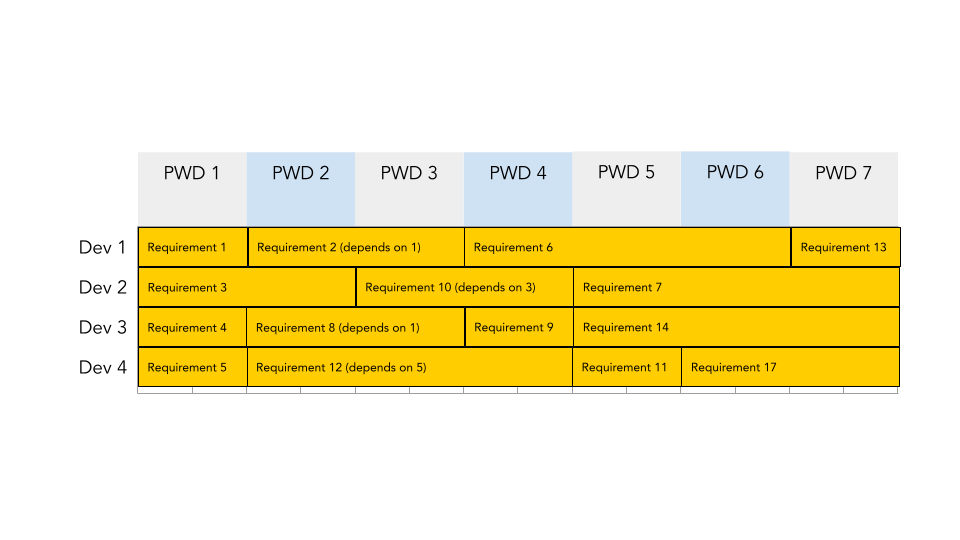
Note that when you fill out the Excel Sheet template provided for Assignment 1, you must enter the requirement number in each cell that the requirement spans. Do not use the merge function. Only place integer values into the cells. Be sure to follow the rules outlined in Assignment 1.
For example, the alternate timeline shown above would look like this in the Excel or Google Sheet template (assuming the iteration length was 7 days and we allowed work on weekends):

Other Considerations
When building your timeline, do your best to ensure that each of the developers on your team is fully assigned work. If they have 7 productive days of work available, try to assign them a set of requirements that respect the dependencies and sum to 7 days of work.
There are, however, other considerations that you might consider when building a timeline.
Should you assign a requirement that depends on another to the same developer? You may opt to do this because it could help achieve the velocity you need to complete the project on time. By doing this, you may reduce the amount of overhead required to bring another developer up to speed. However, you risk having a single developer miss something a second developer might catch. Having a pair of requirements – where one depends on the other – assigned to two developers allows you to identify things before you get too deep into production.
Should you assign work to a developer to spend time on it before and after a weekend? For example, on the previous page, requirement 8 would technically span a weekend since each week in the 10-day iteration would only allow for 3.5 productive working days (given a velocity of 70%). Is it likely that the developer will be able to immediately jump into the task
on Monday morning, or are they going to need to take some time to recall what they did Friday before leaving for the weekend? You may want to avoid scheduling things over the weekend if you think it might negatively impact the velocity you are trying to achieve.
When Timelines Go Long
Regardless of your planning, there’s a chance that the project you’ve been assigned will take longer than you have to build it. Perhaps the team hasn’t been working as effectively as you originally expected or the time estimates aren’t accurate resulting in a lower velocity than planned. Maybe someone quit or was off sick. Or there have been changes identified by the client that weren’t originally planned.
Whatever the case, what do you do if suddenly you realize your timeline is going long?
Typically people immediately resort to adding another person. While this might seem to be a good answer, it is problematic for several reasons. First, a new person will need to be trained – this will take time, so even if they are excellent, they won’t immediately help the velocity (and might make it worse). Second, a new person could impact the dynamics of the team – possibly to the detriment of the project. This is especially true for larger teams that typically require more management. Third, a new person might need more money and resources, but you might not have those on hand.
Another response is to have the team work overtime to get things caught up. Again, this is not the best option because it will affect their health and wellness, stretch budgets, and likely leave the team burnt out. The long-term result is reduced velocity, lack of motivation, and broad dissatisfaction.
Generally speaking, the best approach to a timeline that has gone long is to:
- work with the team to see if there are any specific roadblocks or challenges that might be easily solved.
- work with the client to re-evaluate the requirements, milestones, and timeline. The client should be consulted so that they can be part of the solution. This isn’t suggesting that the client will simply say it’s okay to take more time, nor will they likely open up their wallets to fix the problem. However, keeping them informed keeps them invested in the project, builds trust, and helps them to really identify what is essential and not so essential to the product they want to be built.