
3 Software Design
CONTENT

- Software Design Processes
- Stages Of Software Design
- Planning
- Analysis
- Design
- Implementation
- Testing
- Maintenance
- Where CIS3750 & Software Design Meet
- Where Do Software Design Processes Come From?
- Selecting The Best Software Design Process
The goal of CIS3750 is twofold: by the end of the semester, you should have mastered the learning outcomes of the course (we’ll discuss these in the next chapter), and you should have worked with a team to implement a prototype for our community partners.
To achieve these goals, we’re going to use some tried and tested processes to help us out. In particular, we’re going to use a software design process to allow us to break down our community partner’s project into manageable chunks.
Generally speaking, any design process will begin with problem definition and information collection, followed by brainstorming and developing solutions, gathering feedback, and improving the solution (if necessary).
Software Design Processes
As mentioned previously, software design is not a one-size-fits-all activity. Many different approaches can be used to structure software development, including (but not limited to) the Waterfall, Spiral, and Agile methods.
Likely, you have already learned of some of these processes in other courses, or as part of a job experience. Whether you have or haven’t heard of these methods, take some time to follow the provided links to get a better sense of what each is about.
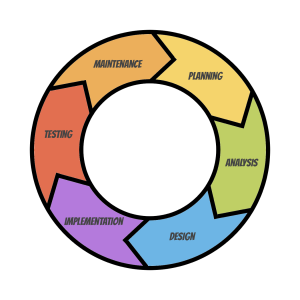
Based on your review and previous exposure to software design processes, you may have already noticed something about them. Despite the vast array of processes available to us, they share similar stages of development: planning, analysis, design, implementation, testing, and maintenance. And you can probably see how these might align with the general design process we just described.
Of course, the methods and tools used and the time and attention paid to each software design phase may differ from one design process to another.
Consider, for example, the case of developing software using either the Waterfall or Agile approaches:
The Waterfall process is used to implement a complete software system at once. This is accomplished by assigning significant resources to the planning and analysis phases before implementation. The planning and analysis phases are completed before any development occurs. During the planning and analysis phases, it is very likely that a complete design document will be developed, including a full list of functional specifications, requirements, definitions, design assumptions, timelines, use cases, UML diagrams, and more. This document is essentially immutable.
The Agile method is an iterative approach that uses feedback to improve and redesign whatever system is being built. Developers will work in small teams in short sprints to build software system components. In this case, a full design document might be replaced by a loose set of requirements, coding standards, a collection of use cases, and perhaps a few UML diagrams.
Stages Of Software Design
As we’ve seen, while different software design processes may use different methods or tools to achieve the goal of developing software, we also know that they go through similar stages to do this. You might wonder – what are the stages, and what does one hope to achieve during them?
Planning
During the planning stage, you define the problem you are trying to solve. This means it is necessary to do your research.
What does research mean? It will depend on the situation. Research might include surveys, focus groups, or informal conversations with your clients and users to identify their needs.
Research could include an investigation that identifies and evaluates how others have approached similar problems or a review and comparison of competing software.
If competing software does exist, you might want to know what it does well, and what it doesn’t do so well.
Research might also involve a market survey.
If a client approaches you with a well-thought-out proposal for a piece of software, the research you must do could be limited to better understanding client terminology.
Whatever the case, it’s good to know the problem and the factors that inform it so you can develop the best software solution possible.
You might also want to identify financial, technical, and human resources. This might include points of contact with the client and within your organization. Or a review of the budget available to complete the project.
Once we’ve completed our research, identified the problem, and understood the resources available, we can consider potential solutions. This might include brainstorming a new and innovative approach or discussing the best development framework, languages, or platforms that could be used to create the solution.
Of course, planning also involves formalizing what the software will do – which might be represented by a formal set of requirements, user stories, or use cases – and who on the team might be responsible for completing them. It includes setting timelines, perhaps identifying coding practices, and setting budgets.
What planning doesn’t include is coding.
Analysis
The analysis stage is when we critically analyze the solution and our development plan. It includes those times when we ask questions like:
- Is this required for the project?
- Do we understand what the client wants?
- Do we have enough time to complete the project?
- Do we have sufficient resources to implement this?
While the analysis stage and the planning stage are listed as unique stages, the reality is that they often overlap. This overlap occurs because as we research, we might need to rethink, reconsider, or reevaluate what we do. It’s not unusual to imagine one particular solution, only to discover that it won’t quite work after learning a new detail from our client.
As software developers, we need to be flexible to these changes.
And of course, depending on the design process you are using, any analysis may overlap with the other stages. It’s not unusual to assume a particular solution makes sense, only to find out after we start designing it that it’s not working.
Finally, the analysis stage might also include conversations about security and privacy, and the potential unintended consequences (and subsequent strategies required to mitigate said unintended consequences) related to the solution you are designing. For more information on this, check out the ACM’s Future of Computing Academy’s It’s Time To Do Something: Mitigating The Negative Impacts Of Computing Through A Change To The Peer Review Process.
In short, the analysis stage represents any points in the development process where we stop and reflect on what we are doing and why we are doing it, and any time we critically assess the solution, our methods, our implementation, or the outcomes they might produce.
Design
The design stage moves beyond simply planning and analysis. In this stage, we begin turning ideas into action – or in other words – building prototypes. How we do this will depend on the complexity of the project, and the resources available.
Prototyping – or building models – is an important part of the software design process. It helps us identify questions we may still have about the client’s needs, and it helps us formalize our potential solution. It’s also a great way to communicate with our clients: it allows us to show them that we understand their problem, to demonstrate a well-thought-out solution, and to include them in the design process.
For many of you, prototyping probably evokes sketches of a website or a mobile app, or perhaps a mock-up of the solution created using a software package. However, prototypes are more than just a representation of the user interface. Prototypes can and should be considered for the database and program functionality.
Depending on the design process you are following and the resources available, the design stage may include developing storyboards, paper prototypes, wireframes, UML diagrams, pseudocode, or more. The design process will likely also include conversations with the client to verify and validate design ideas. This keeps the client informed and feeling part of the design process (and therefore feeling some ownership of the project) and allows you and the design team to correct any incorrect assumptions.
A major outcome of this stage includes some form of design document.
Implementation
The implementation stage involves coding.
This stage includes implementing all elements of the project – which may mean building the database, the API, the user interface, the stack, or more.
This stage also includes monitoring the implementation. This is done using tools such as Gantt Charts, Burndown Charts, Stand Up Meetings, and more to ensure the project remains on target and on time. That isn’t to say that things won’t go wrong or that corrective actions won’t need to be made; but ultimately, this is when you’ll spend time building the thing you’ve taken so much care to design.
More than likely, you’ll probably also have several touch points with the client during this stage to let them know where you are in the design process, any challenges or questions that remain, and any feedback you require.
This stage will likely also include conversations and updates to team velocity and productivity which may require follow-up conversations with the client.
Testing
While testing is identified as a separate stage, the reality is that you should begin testing at the very beginning of the project.
Any critical analysis of the process is, in essence, a test of what you are building. Yes, testing includes formal unit tests and edge case considerations for the code you have developed. It also includes testing assumptions and questioning what you think you know about the client’s problem and the solution you’ve built.
Do not wait to test.
Maintenance
The last stage of software design is maintenance. Typically, software continues to evolve after its initial release. Bugs will be identified that were somehow missed during the testing stages, use cases will come to light that were never considered before, or situations will change that will require the software to be reconsidered. This could include a change to standards, technology, practices, or laws that govern your software (take, for example, the Accessibility for Ontarians with Disabilities Act).
Whatever the reason for the maintenance, new versions of your software will likely be developed to correct bugs, allow for updated features, improve functionality and the user experience, or keep it relevant to your clients and users. The bottom line is that most software is likely never complete, and thus allotting time to maintain it becomes an essential part of the software design process.
You’ll notice, however, that the software design process is presented as a cycle. That’s because in some software design processes, you’ll repeat some or all of these stages in iterations.
It’s also important to remember that these stages aren’t necessarily independent of the other. There will be many cases where things will become slightly blurred, with activities from multiple stages happening at the same time.
Where CIS3750 & Software Design Meet
As mentioned previously, CIS3750 is an introductory software design course. However, it has a very specific focus, with at least two of the three major topics evident in its name: Systems Analysis & Design in Applications. The focus of CIS3750 is on the first three stages of the software design process: Planning, Analysis, and Design.
This means that the things you’ll learn in this course will help you and your team to effectively understand the problem you are trying to solve, and then work to develop a plan of action to make it happen.
This is often a source of frustration for many students who typically want to dive into coding. This is a very natural instinct, especially when we are first presented with a problem to solve. However, in CIS3750 we’re going to have to control this instinct so that we can take our time to fully understand the problem we are trying to solve, critically and carefully identify a solution, and then methodically develop our plan to implement said solution.
Where Do Software Design Processes Come From?
A software design process is, in essence, a game plan or best practice for designing software. That is, a software design process isn’t just invented out of thin air. Instead, it evolves out of numerous case studies that describe, among other things:
- what was being designed (and how this was identified, and verified),
- the processes, methods, and tools used to design, implement, and test the solution,
- a transparent outline of the successes and failures faced along the way, and
- an outline of the challenges (both solved and remaining) faced during the process of creating software.
At some point in time, someone notices that a significant number of case studies seem to describe very similar design approaches for similar projects with most resulting in successful software development (however successful was defined and measured).
It’s at this point that the case studies are synthesized into a process that describes the best practices for achieving software design success, and a name is ascribed to said process.
That’s not to say that the selection of a particular software design process is going to guarantee success or prevent any issues or challenges from arising along the way. They don’t, and they can’t.
They do, however, provide us with the collective knowledge and experiences of many developers who have faced similar challenges and have identified and packaged their best advice in the form of the software design process.
Selecting The Best Software Design Process
So, you might be wondering, how do I select the most appropriate software design process for my project?
Despite the fact that software design processes share similar stages, each of them has its own set of pros and cons. As hinted at earlier in this section, some methods are great for large-scale enterprise-type systems, while others are great for smaller software projects. The choice to use a particular method relies on a number of factors, and in some cases, personal philosophies and preferences.
While we won’t get into a formal discussion here about the most appropriate design process to use in any particular situation, we will return to this discussion throughout the course. Specifically, for every tool that we will learn about in CIS3750, we’ll consider potential situations where it might be best used to develop software.